How do you plan an SEO and ads strategy for the holiday shopping season?
Plan holiday SEO months ahead on permanent, reusable URLs, and use paid search and shopping ads to capture demand while those pages earn rankings. Publish or refresh seasonal pages by early autumn, launch paid campaigns as research starts, and judge both channels on incremental profit, not on platform ROAS alone.
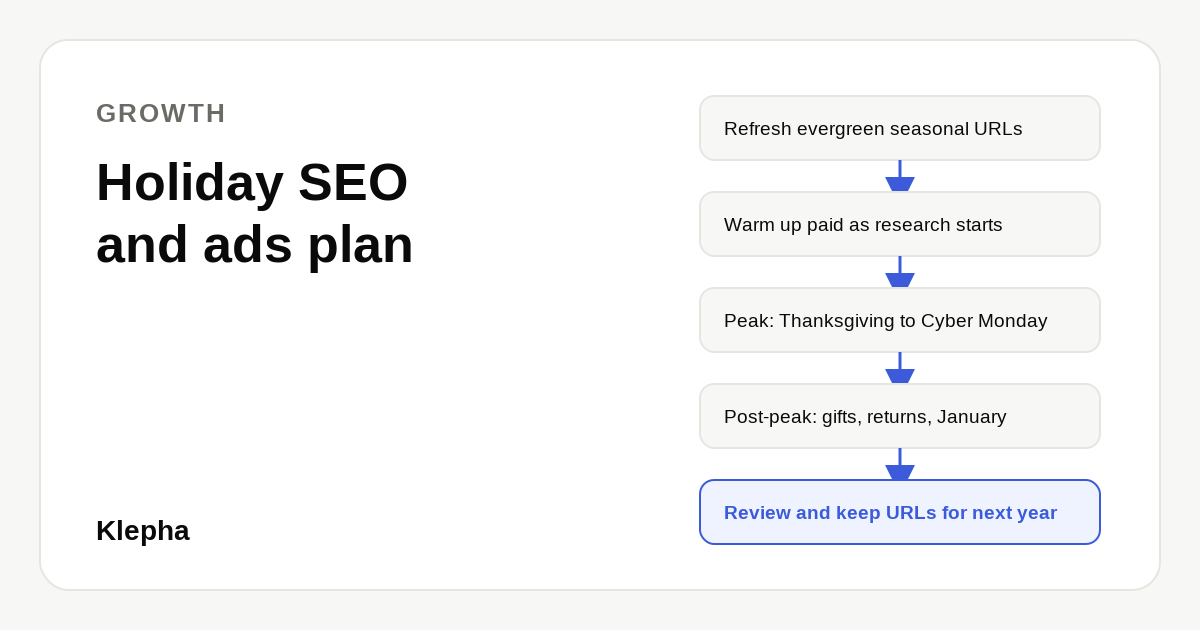
The holiday season compresses a large share of many retailers' year into a few weeks, and the two main search channels move at very different speeds. Paid search can go live in an afternoon. Organic rankings for competitive seasonal terms usually take months. A good plan uses each channel for what it does well instead of asking either one to do everything.
This guide covers how to balance paid and organic, when to launch pages and campaigns, and what to measure in each phase. In 2026, Thanksgiving falls on Thursday, November 26, Black Friday on November 27 and Cyber Monday on November 30. If you are reading this in mid November, the section on what to do with two weeks left is for you; the rest is the plan to start earlier next year.
Key takeaways
- Organic is slow, paid is fast. Build seasonal SEO on permanent URLs months ahead; use paid search to cover demand while those pages earn rankings.
- Keep one URL per seasonal page, every year. A page like /black-friday that stays live keeps its links and history. A new URL each year starts from zero.
- Launch paid in steps. Prospecting as research starts, heavier budgets from Thanksgiving week to Cyber Monday, then gift card and January campaigns.
- Set profit guardrails first. Discounts lower your contribution margin, which raises break-even ROAS. Recalculate before the sale, not after.
- Measure incrementally. Compare blended revenue against total spend and against last year, and watch whether paid is buying sales organic would have won.
How should you balance paid and organic during the holidays?
Think of the two channels as having different lead times and different costs:
| Organic search (SEO) | Paid search and shopping ads | |
|---|---|---|
| Lead time | Months for competitive terms | Hours to days |
| Cost per visit | No click cost, but content and development time | Rises in peak weeks as competition for clicks increases |
| Control over timing | Low: rankings move on Google's schedule | High: start, stop and change budgets at will |
| Best use in the season | Evergreen gift guides, category pages and seasonal hubs that rank every year | Capturing peak demand, new products, last-minute deals and gaps in organic coverage |
| Main risk | Starting too late to rank this year | Overspending on clicks that would have converted anyway |
The practical split follows from that table. Where your pages already rank well for a holiday term, paid search mostly needs to defend the position against competitors bidding on your brand and to cover shopping ad space. Where you have no organic presence, paid search carries the load this year while you build the page for next year. Run a competitor analysis on your main seasonal terms to see which group each one falls into.
There is no correct percentage split that suits every business. Decide by query group: for each group, note your organic position, last year's paid results and your margin, then set the paid budget that the margin can support.
When should you launch holiday pages and campaigns?
Working back from a late November peak, a typical calendar looks like this. Adjust it if your category peaks earlier, such as toys, or later, such as last-minute gifts.
| When | SEO tasks | Paid tasks |
|---|---|---|
| July to August | Keyword research from last year's Search Console data; plan gift guides and seasonal hubs; fix technical issues on category pages | Review last season's search terms and negative keyword lists; check conversion tracking |
| September | Publish new seasonal pages or refresh existing ones on their permanent URLs; add internal links from high-traffic pages | Plan budgets per phase; prepare creative and promotions; build audience lists |
| October | Update product data, stock and prices; improve page speed; secure mentions in gift guides and roundups | Launch prospecting and early-bird campaigns; test landing pages |
| November to Cyber Monday | Switch seasonal hubs to show live deals; avoid big site changes; monitor rankings | Raise budgets for peak days; use seasonality adjustments for short, predictable conversion spikes |
| December | Promote shipping cutoffs and gift cards; keep pages live after the sale | Shift to last-minute delivery, gift card and local pickup messages |
| January | Update pages for returns, sales and next year; keep URLs live | Run returns-period and new-year campaigns; analyse results |
The reason for publishing early is crawling and ranking time. Google needs to discover the page, crawl it and decide where it fits, and links to a new page take time to build. A refreshed page on a URL that already ranks from last year has a large head start.
Why should seasonal pages keep the same URL every year?
A page like /black-friday or /gift-guide-for-runners that stays live all year collects links, internal links and ranking history. If you publish /black-friday-2026 and delete it in January, next year's page starts with none of that.
- Use one permanent URL per theme, without the year in the slug. Put the year in the title and the content.
- Keep the page live outside the season. After the sale, change it to say when the next event is, show current offers, or link to evergreen categories. Do not redirect it to the homepage or return a 404.
- Link to it from your main navigation or homepage during the season, so both users and crawlers see it as important.
- Update the date and content each year so the page is accurate. A stale "2024 deals" heading in 2026 hurts trust and click-through.
If you already have several year-specific URLs, choose the strongest one, move the content there and 301 redirect the others to it. Our guide to canonical tags and duplicate content explains when a redirect is better than a canonical.
Which SEO tasks matter most before the holidays?
- Category and product pages first. Most holiday purchases happen on these pages, not on blog posts. Make sure titles, descriptions, stock status, prices and structured data are accurate. See our on-page SEO checklist.
- Gift guides that answer real questions. "Gifts for runners under $50" is a specific query with clear intent. Build guides around budgets, recipients and use cases, and link directly to the products.
- Product data for shopping surfaces. Google's shopping results and AI shopping experiences rely heavily on product feeds and structured data. Keep prices, availability and shipping details correct in Merchant Center and on the page.
- Local presence. If you have stores, update holiday hours and services in your Google Business Profile.
- AI assistants. More shoppers now ask assistants for gift ideas and comparisons. Clear buying guides, honest comparisons and accurate product facts make your pages easier to cite. Our guide to ChatGPT shopping and product discovery covers the details.
- A change freeze near the peak. Avoid migrations, URL changes or template rebuilds in the weeks before your biggest sales days.
Also keep an eye on Google's update calendar. Google started its November 2026 core update this month, and rankings can move during a rollout. Our core updates guide explains how to separate update effects from seasonal swings.
Are you visible where holiday shoppers ask for recommendations?
A free Klepha report shows whether Google and AI assistants name your brand when shoppers ask for gift ideas and product comparisons in your category.
Get my free reportHow should you set up paid campaigns for the season?
- Recalculate break-even ROAS with the discount. A 20% discount cuts your margin, so the return you need from ads goes up. Our break-even ROAS guide shows the formula.
- Separate brand and non-brand campaigns so you can see how much of your holiday paid revenue is people already looking for you.
- Refresh negative keywords. Holiday queries bring more irrelevant searches, such as "free", "jobs" or competitor store hours. Review search terms daily in peak week and update your negative keyword lists.
- Use seasonality adjustments carefully. In Google Ads, seasonality adjustments tell Smart Bidding to expect a short, predictable change in conversion rate, such as a one to seven day sale. They are not meant for the whole season, because bidding already learns gradual seasonal trends.
- Plan budget by day, not by month. Spend is often concentrated on a few days. Make sure daily budgets on Black Friday and Cyber Monday are not capped before evening.
- Match ads to landing pages. Send deal ads to the seasonal hub or a deal category, not the homepage. See our guide to landing pages for paid ads.
- Cap retargeting frequency. Holiday retargeting is tempting and easy to overdo. Our notes on retargeting without annoying people cover caps and windows.
Check your promo codes too. AI engines now show coupon codes directly in answers, so publish one official page with current codes and expiry dates; our guide to coupon codes in AI answers explains how to manage them.
What can you still do with only two weeks to go?
If the season is almost here and SEO groundwork was not done, focus on what can still move:
Enterprise buyers in Display & Video 360 have two new holiday options this year, Google Audiences on Spotify and programmatic Pinterest inventory. See how holiday advertisers can use DV360’s Spotify and Pinterest options. On Bing, Microsoft now shows ads next to AI Overviews through existing campaigns; see Microsoft Advertising’s November 2026 updates.
- Refresh pages that already rank. Update titles, dates, offers and internal links on pages with existing impressions. These can benefit quickly; new pages rarely can.
- Put paid search on the terms you cannot rank for this year, within your profit guardrails.
- Fix feed and stock errors. Products that show as out of stock or with the wrong price lose both paid and free shopping visibility.
- Email and existing customers. Your list does not depend on rankings or auction prices.
- Publish the permanent seasonal URL anyway. It may not rank this year, but it starts collecting links and history for next year.
What should you measure before, during and after the peak?
| Phase | Metrics | What it tells you |
|---|---|---|
| Before | Impressions and average position for seasonal queries in Search Console; indexed seasonal pages; conversion tracking checks | Whether organic pages are ready and whether paid data will be trustworthy |
| During | Daily spend, conversions, cost per acquisition and ROAS against break-even; stock levels; site speed and errors | Whether to raise, hold or cut budgets day by day |
| After | Blended revenue against total marketing spend (MER); new versus returning customers; organic clicks year over year; returns | Whether the season was profitable and which channel created incremental sales |
Compare year over year by aligning days of the week, because Black Friday moves across calendar dates. Tag every campaign with consistent UTM parameters so email, social and paid traffic are separable in analytics, and check that conversion tracking works before the first peak day, not during it.
One useful check on incrementality: look at organic clicks for brand terms on days when brand paid campaigns were running at full budget versus reduced budget. If organic clicks rise when paid falls, part of the paid spend was capturing customers who would have arrived anyway.
What should you do after the season ends?
- Export Search Console data for seasonal queries and pages, so next year's planning starts from evidence.
- Save the paid search terms report, including the negatives you added during peak week.
- Update seasonal pages to their off-season state without changing their URLs.
- Write down what sold, which offers worked and which days were constrained by budget or stock.
- Put next year's SEO deadline in the calendar now, in early autumn.
For help connecting organic, AI search and paid performance, see our Blog Ranking solution, the disciplines on our expertise page, and our case studies.
Sources
- Google Search Central, "Ecommerce SEO best practices" documentation hub, cited November 18, 2026. developers.google.com
- Google Ads Help, "About seasonality adjustments", cited November 18, 2026. support.google.com
- Google Ads Help, "About Smart Bidding", cited November 18, 2026. support.google.com
- Google Search Console Help, "Performance report (Search results)", cited November 18, 2026. support.google.com
- Google Search Central, "Redirects and Google Search", cited November 18, 2026. developers.google.com
Frequently asked questions
When should I start holiday SEO?
Start planning in summer and publish or refresh seasonal pages by September, so search engines have time to crawl and rank them before November. Pages on URLs that already ranked last year can respond faster than brand new pages.
Should seasonal landing pages have the year in the URL?
No. Use one permanent URL per theme, such as /black-friday, and put the year in the title and content. Keeping the same URL each year preserves links and ranking history that a new URL would lose.
How should I split budget between paid and organic in the holidays?
Split by query group rather than by a fixed percentage. Where you already rank well, paid mostly defends brand terms and shopping space. Where you have no organic presence, paid carries demand this year while you build pages for next year, within the limits your margin allows.
Should I use seasonality adjustments in Google Ads for the whole season?
No. Seasonality adjustments are designed for short, predictable changes in conversion rate, such as a sale lasting a few days. Smart Bidding already adapts to gradual seasonal trends, so use adjustments only around specific events.
What should I do with holiday pages after the season?
Keep them live on the same URL. Update the content to show current offers or when the next event starts, rather than deleting the page or redirecting it to the homepage, so it keeps its history for next year.