What happened to AI impressions in Search Console on November 9 to 11, 2026?
Google confirmed that a logging error decreased impressions in the Search Console Generative AI performance report for November 9 to 11, 2026, and says it affects data logging only, not how sites appeared in Search. Because the November 2026 core update started on November 10, inside that window, annotate the three days and compare core update impact using clicks from the main Performance report rather than AI impressions.
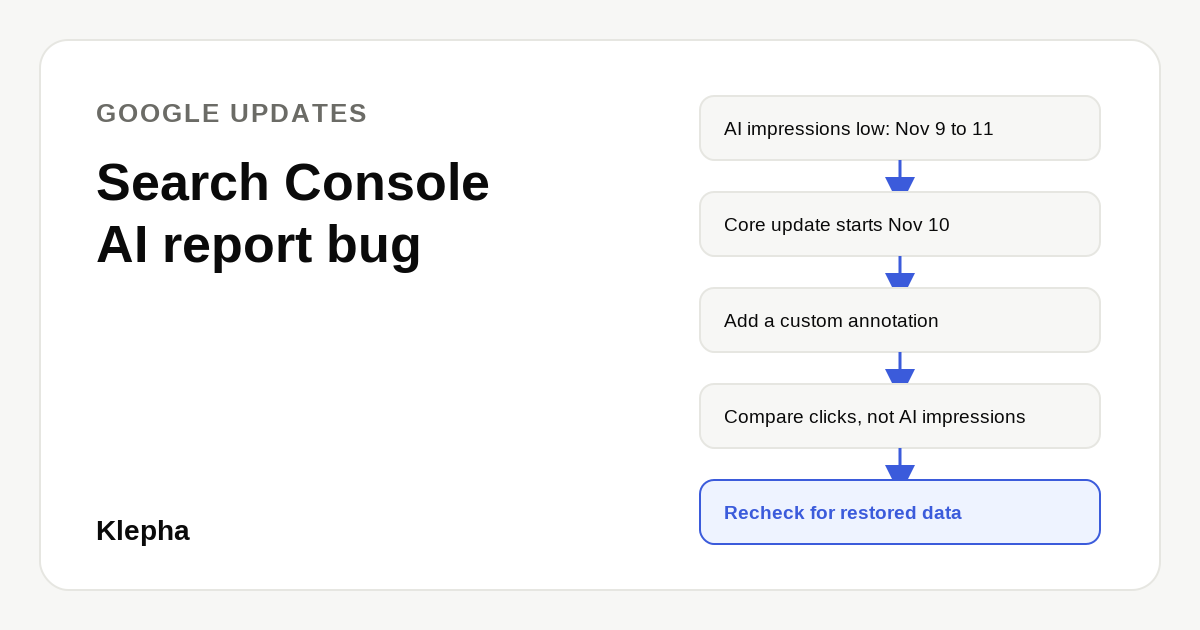
If your Generative AI performance report in Search Console shows a sudden dip in impressions around November 10, it is very likely a reporting problem, not a loss of visibility. Google has listed the issue on its data anomalies page, and the report itself carries a system annotation for it.
The timing makes it awkward. The same three days include the start of the November 2026 core update, so a real ranking change and a reporting gap overlap. This guide explains what Google confirmed, how to annotate your reports so nobody misreads them later, and why clicks are the cleaner measure for the next few weeks. Facts were checked against Google documentation on November 18, 2026.
Key takeaways
- It is a logging error. Google says the issue decreased impressions in the Generative AI performance report for November 9 to 11, 2026, and "affects data logging only".
- It overlaps the core update. The November 2026 core update started on November 10 at 10:06 Pacific time, inside the affected window.
- Annotate it. Search Console adds a system annotation, but add your own custom annotations for the bug and the core update so exports and screenshots carry the context.
- Use clicks for comparisons. The generative AI report measures impressions only, and the error affects those impressions. Clicks in the main Performance report are not part of the reported issue.
- Recheck later. After a similar bug in August, Google restored the missing data four days later. No restoration had been announced for November as of November 18.
What did Google confirm about the logging error?
Google's "Data anomalies in Search Console" page, which records known reporting issues, now includes this entry under Performance reports for 2026:
"A logging error caused a decrease in impressions on the Generative AI performance report in Search for data from November 9 - November 11, 2026. This issue affects data logging only."
Search Engine Roundtable reported the confirmation on November 12, 2026 and noted that the report shows an annotation for the error. Three things follow from Google's wording:
- The affected report is the Generative AI performance report for Search. Google's note does not list the main Search results Performance report or Discover for these dates.
- The affected metric is impressions, and the direction is a decrease. If you see fewer AI impressions on those days, that is the expected symptom.
- "Data logging only" means the problem is in what Search Console recorded, not in how Google Search showed your pages. Your actual appearances in AI Overviews and AI Mode were not reduced by this bug.
What does the Generative AI performance report measure?
The report shows how often links to your site appeared in generative AI features on Google Search. According to Google's help page, it currently covers AI Overviews and AI Mode, and since August 31, 2026 it has been available to all websites worldwide. You can group the data by page, country, date and device, and filter by text or multimodal search.
| Question | What Google's documentation says |
|---|---|
| Which features are included? | AI Overviews and AI Mode. Search Labs experiments are excluded. |
| What is the main metric? | Impressions: how many times links to your site were shown in a generative AI feature. |
| How is the chart aggregated? | By property. Two links from the same site in one AI answer count as one impression in the chart total. |
| Which time zone? | All dates are in Pacific Time. |
| How does it relate to the main report? | It includes data from the Web search type in the Performance report for Search results. |
Because impressions are the report's core metric, a logging error on impressions hits the report hard. If you have been using it to track AI brand visibility, those three days will look like a dip that never happened.
Why does the overlap with the November core update matter?
Google's Search Status Dashboard lists the November 2026 core update as starting on November 10, 2026 at 10:06 Pacific time, with a rollout that may take up to two weeks. That start date sits in the middle of the logging error window. Two days later, on November 12, Google also made Gemini 4 Hydrogen the default model in AI Mode, which can change which sources AI Mode cites.
The result is three overlapping events in one week:
| Date (Pacific Time) | Event | Effect on your data |
|---|---|---|
| November 9 to 11 | Logging error in the Generative AI report | AI impressions undercounted; no effect on real visibility |
| November 10 | November 2026 core update begins | Real ranking changes possible across the rollout |
| November 12 | Gemini 4 Hydrogen becomes the default AI Mode model | Real changes possible in AI Mode answers and citations |
If you compare AI impressions from the week before with the week of November 9, you will see a fall caused partly by the bug and partly, perhaps, by the update. There is no way to separate the two inside that metric for those days. Our core updates guide covers how to track the update itself, and our note on Gemini 4 Hydrogen in AI Mode covers the model change.
How do you annotate your reports for the bug?
Search Console shows a system annotation for known issues like this one. System annotations are created by Google to flag data processing and reporting issues. Add your own custom annotations as well, worded for your team, so anyone reading the chart months from now sees the full context, including the core update.
Google's annotations help page describes how custom annotations work:
- Open the Performance report.
- Right-click the chart on the date you want to annotate.
- Pick the date in the date picker.
- Type a note of up to 120 characters.
- Click Add.
Suggested notes for this week:
- November 9: "Google logging error: AI report impressions low Nov 9 to 11 (data only)".
- November 10: "November 2026 core update starts 10:06 PT".
- November 12: "Gemini 4 Hydrogen default in AI Mode".
Some limits worth knowing: a property can hold up to 200 custom annotations, annotations are shared with all owners and full users of the property, they cannot be edited (only deleted and re-added), annotations older than 500 days are deleted automatically, and they do not appear in comparison mode or 24 hour views. Google also asks you not to put personal information such as names in them.
Outside Search Console, add the same notes to any dashboard or spreadsheet built from Search Console data, so the context sits next to the numbers wherever they are reported. A simple "data notes" tab in your reporting template works.
Want a second view of your AI visibility that does not depend on one report?
A free Klepha report checks whether ChatGPT, Gemini and Perplexity mention and cite your brand for your buyers' questions, alongside your Search Console data.
Get my free reportWhy are clicks a cleaner comparison right now?
The generative AI report gives you impressions, and those are exactly what the logging error reduced. Clicks sit in the main Performance report for Search results, which Google's anomaly note for November 9 to 11 does not mention. For judging the core update over the next few weeks, that makes clicks the more reliable series.
There is a second reason to lean on clicks. Impressions have been the fragile metric in Search Console this year. Google's anomalies page also records a long-running impressions logging error in the main Performance report, listed under April 3, 2026, and states that clicks were not affected by it. Clicks are also closer to business value: an impression in an AI Overview does not mean anyone saw or used your link.
A practical way to compare:
- Pick clean baseline weeks. Use October 27 to November 2 and November 2 to 8 as your "before" periods. Avoid November 9 to 11 for any impression metric.
- Wait for the rollout to finish. Google recommends waiting at least a full week after a core update completes before analysing. Compare full weeks with the same days of the week.
- Compare clicks by page and query in the main Performance report, Web search type. Look for groups of pages that moved together rather than single URLs.
- Use AI impressions only outside the bug window. Compare November 12 onward with the weeks before November 9 if you need an AI visibility trend, and label the gap.
- Cross-check with analytics. Organic sessions and conversions in GA4 are independent of Search Console's logging. If Search Console impressions fall but clicks, sessions and conversions hold, the fall is probably reporting.
If you do see a real decline in clicks, our guide on why website traffic drops walks through the diagnosis.
Will Google restore the missing data?
Possibly, but there is no promise. A similar logging error hit the same report for August 13 to 17, 2026. Google's anomalies page later added: "Missing data for this period has been restored. The Performance report now shows complete metrics." That update was dated August 21, four days after the affected period ended.
As of November 18, 2026, the November entry has no such update. Check the data anomalies page again before you finalize monthly or quarterly reports. If the data is restored, remove or edit your custom annotation note so it does not suggest the gap still exists. If it is not, keep the annotation and exclude those days from AI impression trends.
What should agencies and in-house teams tell stakeholders?
November reports will land on desks just as people are asking about the core update. A short, plain explanation avoids a bad decision:
- Say what happened: Google confirmed a reporting error that undercounted AI Overviews and AI Mode impressions for November 9 to 11. It did not change how the site appeared in Search.
- Say what you are measuring instead: clicks, sessions and conversions, compared over full weeks once the core update rollout is complete.
- Say when you will know more: after the rollout ends and at least a week of post-update data is available.
For a broader view of monitoring across Google and AI assistants, see our guide to monitoring SEO and AI performance. Our ChatGPT Ranking solution covers AI visibility tracking beyond Google, and our expertise page and case studies describe how we analyse updates.
Sources
- Google Search Console Help, "Data anomalies in Search Console", entries for November 9 to 11 and August 13 to 17, 2026, checked November 18, 2026. support.google.com
- Google Search Console Help, "Generative AI performance report (Search)", checked November 18, 2026. support.google.com
- Google Search Console Help, "Search Console annotations", checked November 18, 2026. support.google.com
- Search Engine Roundtable (Barry Schwartz), "Google Search Console Generative AI Performance Report Data Bug Nov 9 - 11", November 12, 2026. seroundtable.com
- Google Search Status Dashboard, ranking incident history including the November 2026 core update, as summarized in our core updates guide. status.search.google.com
- Google Search Central, "Google Search's core updates and your website", for the advice to wait a full week after completion before analysing. developers.google.com
Frequently asked questions
Did my site lose AI Overview visibility on November 9 to 11, 2026?
Not because of this issue. Google says the logging error decreased impressions in the Generative AI performance report and affects data logging only, so it changed what Search Console recorded, not how your pages appeared in AI Overviews or AI Mode.
Which Search Console report was affected?
The Generative AI performance report for Search, which covers AI Overviews and AI Mode. Google listed the decrease in impressions for November 9 to 11, 2026 on its data anomalies page.
Why should I use clicks instead of impressions right now?
The Generative AI report measures impressions, which the bug reduced, and the November core update started on November 10 inside the same window. Clicks in the main Performance report are not part of the reported issue, so they give a cleaner before and after comparison.
How do I add an annotation in Search Console?
Open the Performance report, right-click the chart on the date, choose the date, type a note of up to 120 characters and click Add. A property can hold up to 200 custom annotations, shared with owners and full users.
Will Google restore the missing AI impressions?
It might. After a similar error on August 13 to 17, 2026, Google restored the missing data on August 21. As of November 18, 2026, Google had not announced a restoration for November 9 to 11, so check the data anomalies page before finalizing reports.